




Automatically Detect and Highlight Missing Data in Google Sheets Using Apps Script
$ 9.97
📥 **Your Purchase Includes:**
– Immediate access to the Google Sheets template.
– Downloadable Apps Script code for flexibility and customization.
– In-depth tutorial for a guided learning experience.
🛍️ **Make your purchase today
YouTube Channel: https://www.youtube.com/@TechTrickswithEli2023
Telegram Channel: https://t.me/techtrickswithEli
Automatically Detect and Highlight Missing Data in Google Sheets Using Apps Script
Boost your workflow and eliminate spreadsheet errors with our step-by-step Google Sheets Apps Script tutorial. In this training, you’ll learn how to automatically detect, flag, and highlight missing or incorrect data inside any Google Sheet, perfect for data managers, analysts, business owners, and anyone working with large datasets.
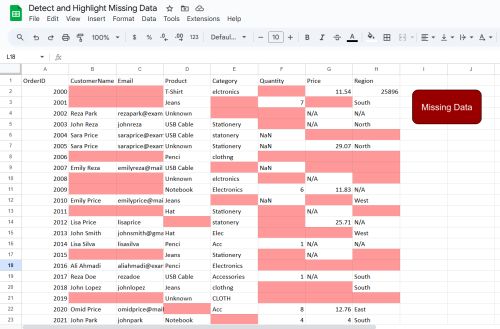
This tutorial walks you through building a fully automated Missing Data Highlighter, powered by Apps Script. You’ll discover how to scan entire sheets, validate entries, find empty cells, catch incomplete records, and instantly apply color-coded formatting so nothing slips through the cracks.
Whether you manage CRM data, survey responses, product lists, business reports, or operational sheets, this tool helps you keep your spreadsheets clean, accurate, and ready for analysis, without manually checking rows one by one.
Key Features You’ll Learn
-
✔️ Fully automated missing-data detection
-
✔️ Highlight empty cells, incomplete rows, and inconsistent entries
-
✔️ Scan thousands of rows in seconds
-
✔️ Customize colors, rules, and validation logic
-
✔️ Run with a single click or set on auto-trigger
-
✔️ Beginner-friendly Apps Script walkthrough
Why This Tutorial Is Perfect for You
If you rely on Google Sheets for business or content creation, manual data checking is frustrating and inefficient. This tutorial helps you eliminate human error and build a powerful script that keeps your spreadsheets clean 24/7.
It’s practical, real-world automation, no coding experience required.
Perfect For:
-
Data analysts & researchers
-
Small business owners
-
Digital marketers
-
Admins & operations teams
-
Anyone managing large or messy spreadsheets
🚀 Why You’ll Love This Tutorial
-
Saves hours of manual copy-pasting
-
Helps you master automation inside Google Sheets
-
Comes with code explanation and real-world examples
-
Practical, easy, and reusable for your own projects
💡 Stay organized, save time, and ensure nothing slips through the cracks!
YouTube Channel: https://www.youtube.com/@TechTrickswithEli2023
Telegram Channel: https://t.me/techtrickswithEli