
- Version
- Download 9
- File Size 730.11 KB
- File Count 1
- Create Date June 3, 2026
- Last Updated June 3, 2026
ARRAYFORMULA Cheat Sheet
ARRAYFORMULA Cheat Sheet for Google Sheets
The Ultimate Google Sheets ARRAYFORMULA Cheat Sheet (Free Download)
Looking for a quick and practical guide to mastering the ARRAYFORMULA function in Google Sheets? This ARRAYFORMULA Cheat Sheet is designed to help you automate calculations, eliminate repetitive formulas, and build more powerful spreadsheets with ease.
Whether you're a student, data analyst, business owner, accountant, teacher, or spreadsheet enthusiast, this downloadable cheat sheet provides the essential ARRAYFORMULA syntax, examples, and best practices you need to work smarter in Google Sheets.
What Is ARRAYFORMULA in Google Sheets?
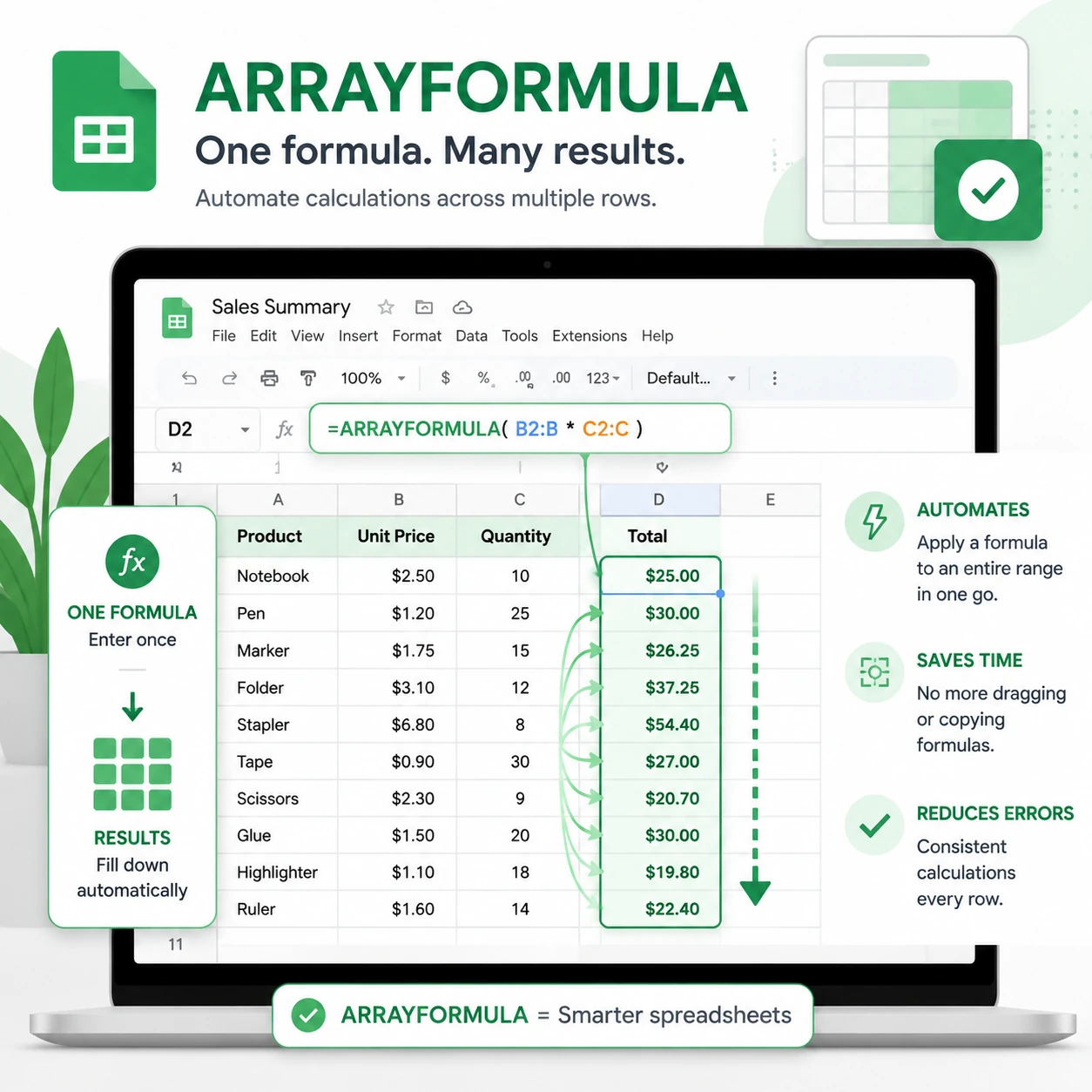
The ARRAYFORMULA function allows you to perform calculations on entire ranges of data using a single formula instead of copying formulas down hundreds or thousands of rows.
By using ARRAYFORMULA, you can:
- Automate spreadsheet calculations
- Reduce manual work
- Create dynamic reports
- Improve spreadsheet performance
- Build scalable dashboards and trackers
- Eliminate formula drag-and-fill tasks
ARRAYFORMULA is one of the most powerful functions available in Google Sheets and is widely used in data analysis, reporting, CRM systems, project management tools, and financial models.
What You'll Learn in This ARRAYFORMULA Cheat Sheet
✓ ARRAYFORMULA Syntax Explained
Understand the structure of the function and when to use it.
✓ Basic ARRAYFORMULA Examples
Learn how to apply formulas across entire columns instantly.
✓ Multiple Column Calculations
Perform calculations involving several columns without copying formulas.
✓ Conditional ARRAYFORMULA Examples
Combine ARRAYFORMULA with IF, IFERROR, and logical functions.
✓ Text Manipulation with ARRAYFORMULA
Apply text functions across entire datasets automatically.
✓ Dynamic Data Processing
Create spreadsheets that automatically update as new data is added.
✓ Common Errors and Fixes
Avoid the most frequent mistakes users make when working with ARRAYFORMULA.
What's Included in the Download?
Comprehensive Formula Reference
Quick access to commonly used ARRAYFORMULA patterns and structures.
Real-World Examples
Practical use cases for business, education, finance, sales tracking, and reporting.
Best Practices Guide
Learn how to build efficient and maintainable spreadsheets.
Troubleshooting Section
Identify and fix common ARRAYFORMULA issues quickly.
Printable PDF Format
Perfect for keeping on your desktop, tablet, or printed workspace.
Sample ARRAYFORMULA Examples
Calculate Values Across an Entire Column
=ARRAYFORMULA(B2:B*C2:C)
Apply an IF Statement to Multiple Rows
=ARRAYFORMULA(IF(B2:B>100,"High","Low"))
Combine Text Automatically
=ARRAYFORMULA(A2:A&" "&B2:B)
Handle Errors Across a Range
=ARRAYFORMULA(IFERROR(B2:B/C2:C,""))
Convert Text to Uppercase
=ARRAYFORMULA(UPPER(A2:A))
Benefits of Using ARRAYFORMULA
Save Time
Replace hundreds of copied formulas with a single formula.
Reduce Errors
Maintain consistency across your datasets.
Build Dynamic Dashboards
Automatically process incoming data without manual updates.
Improve Productivity
Spend less time managing formulas and more time analyzing data.
Scale Your Sheets
Handle growing datasets more efficiently.
Who Should Download This Cheat Sheet?
This resource is ideal for:
- Google Sheets users
- Data analysts
- Business professionals
- Accountants and bookkeepers
- Students and teachers
- Project managers
- Sales teams
- Marketing analysts
- Operations specialists
- Dashboard creators
Whether you're a beginner learning Google Sheets or an advanced user building automated systems, this cheat sheet will help you get more value from ARRAYFORMULA.
Why ARRAYFORMULA Is Essential for Google Sheets Users
Many users spend hours copying formulas down rows manually. ARRAYFORMULA eliminates this repetitive task by allowing one formula to process entire datasets automatically.
Learning ARRAYFORMULA can dramatically improve your spreadsheet workflow and unlock more advanced automation techniques in Google Sheets.
If you regularly work with reports, trackers, CRM systems, inventory management, budgets, dashboards, or large datasets, mastering ARRAYFORMULA is a must.
Related Google Sheets Resources
You may also be interested in:
- VLOOKUP Cheat Sheet
- XLOOKUP Cheat Sheet
- QUERY Function Cheat Sheet
- FILTER Function Cheat Sheet
- INDEX MATCH Cheat Sheet
- IF Function Cheat Sheet
- SUMIF & SUMIFS Cheat Sheet
- Conditional Formatting Guide
- Google Sheets Dashboard Templates
Download the ARRAYFORMULA Cheat Sheet
Download now and become more efficient with Google Sheets ARRAYFORMULA formulas.