
- Version
- Download 2
- File Size 1.26 MB
- File Count 1
- Create Date June 3, 2026
- Last Updated June 3, 2026
CONCAT Function Cheat Sheet
CONCAT Function Cheat Sheet for Google Sheets
The Ultimate Google Sheets CONCAT Cheat Sheet (Free Download)
Want a quick and easy guide to combining text in Google Sheets? This CONCAT Function Cheat Sheet is a practical reference designed to help you merge text, create dynamic labels, combine names, and streamline your spreadsheet workflows.
Whether you're a student, business professional, data analyst, teacher, marketer, or spreadsheet enthusiast, this downloadable cheat sheet provides the essential CONCAT function syntax, examples, and best practices you need to work more efficiently in Google Sheets.
What Is the CONCAT Function in Google Sheets?
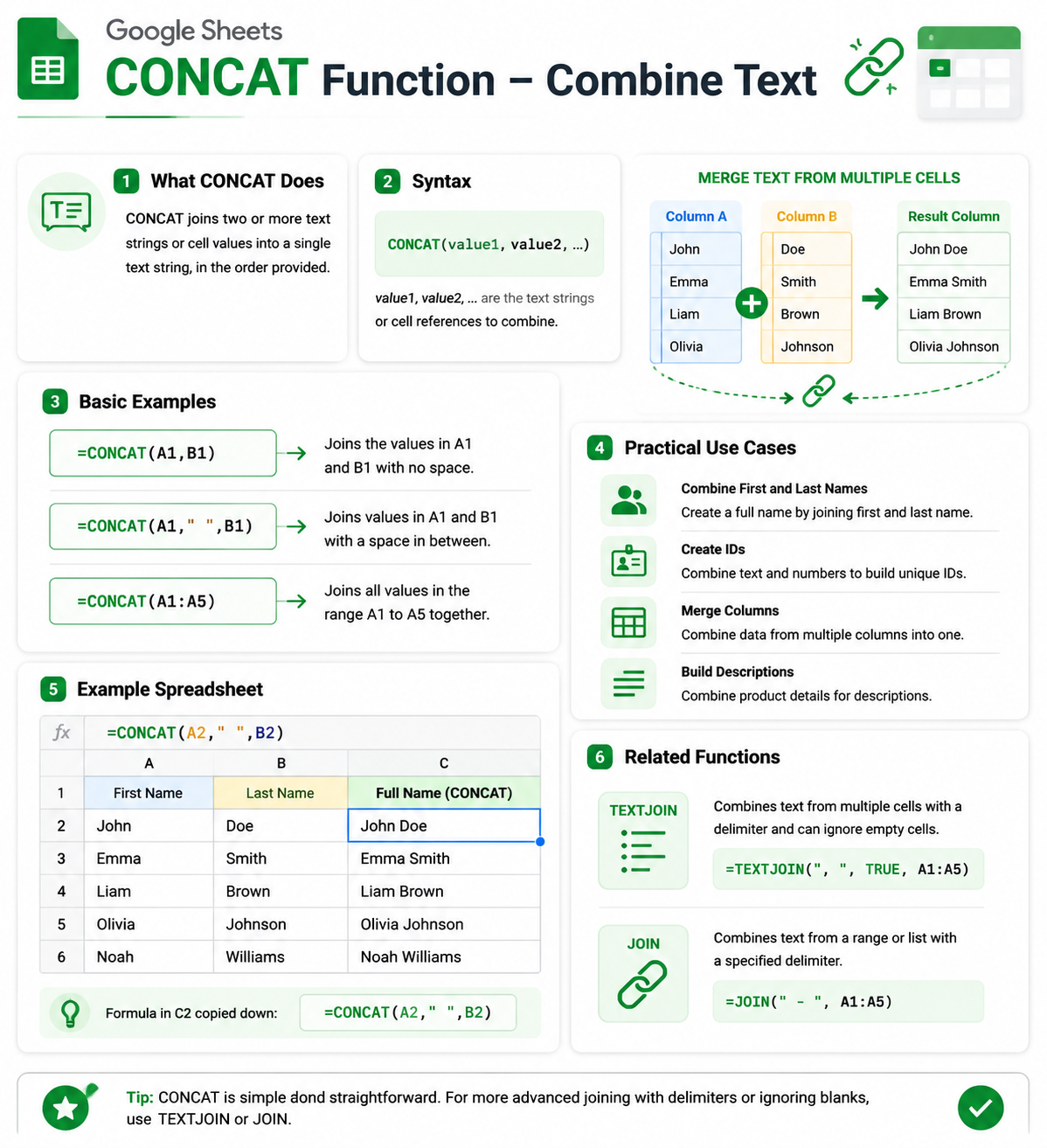
The CONCAT function allows you to combine two text values into a single string.
It is commonly used for:
- Combining first and last names
- Creating custom IDs
- Merging text from multiple cells
- Building dynamic labels
- Formatting reports
- Creating email addresses and usernames
- Cleaning and organizing data
The CONCAT function is one of the simplest yet most useful text functions in Google Sheets.
Sample CONCAT Function Examples
Combine First and Last Name
=CONCAT(A2,B2)
Add a Space Between Names
=CONCAT(A2," "&B2)
Create a Custom Product Code
=CONCAT("PROD-",A2)
Combine Text and Numbers
=CONCAT("Order #",B2)
Build an Email Address
=CONCAT(A2,"@company.com")
Benefits of Using CONCAT
Save Time
Combine text values quickly without manual editing.
Improve Data Organization
Create consistent labels, IDs, and naming conventions.
Build Dynamic Reports
Generate automatic text outputs based on changing data.
Simplify Spreadsheet Workflows
Reduce repetitive formatting tasks.
Enhance Data Presentation
Create cleaner and more professional-looking spreadsheets.
Who Should Download This Cheat Sheet?
This resource is perfect for:
- Google Sheets users
- Students and educators
- Data analysts
- Marketing professionals
- Sales teams
- HR professionals
- Small business owners
- Project managers
- Administrative assistants
- Dashboard creators
Whether you're just getting started with Google Sheets or looking to improve your spreadsheet skills, this cheat sheet provides a quick reference you can use every day.
Why Learn the CONCAT Function?
Text manipulation is an essential spreadsheet skill. The CONCAT function helps you combine information from multiple cells, automate formatting tasks, and create more professional spreadsheets.
While Google Sheets also offers functions like CONCATENATE and TEXTJOIN, CONCAT remains one of the easiest ways to merge text values quickly and efficiently.
Learning CONCAT can improve productivity and help you build cleaner, smarter spreadsheets.
Related Google Sheets Resources
You may also be interested in:
- ARRAYFORMULA
- TEXTJOIN Cheat Sheet
- CONCATENATE Cheat Sheet
- SPLIT Function Cheat Sheet
- LEFT, RIGHT & MID Cheat Sheet
- QUERY Function Cheat Sheet
- IF Function Cheat Sheet
- VLOOKUP Cheat Sheet
- XLOOKUP Cheat Sheet
- Google Sheets Dashboard Templates