
- Version
- Download 1
- File Size 1.33 MB
- File Count 1
- Create Date June 7, 2026
- Last Updated June 7, 2026
COUNTIF Function Cheat Sheet
COUNTIF Function Cheat Sheet for Google Sheets
The Ultimate Google Sheets COUNTIF Cheat Sheet (Free Download)
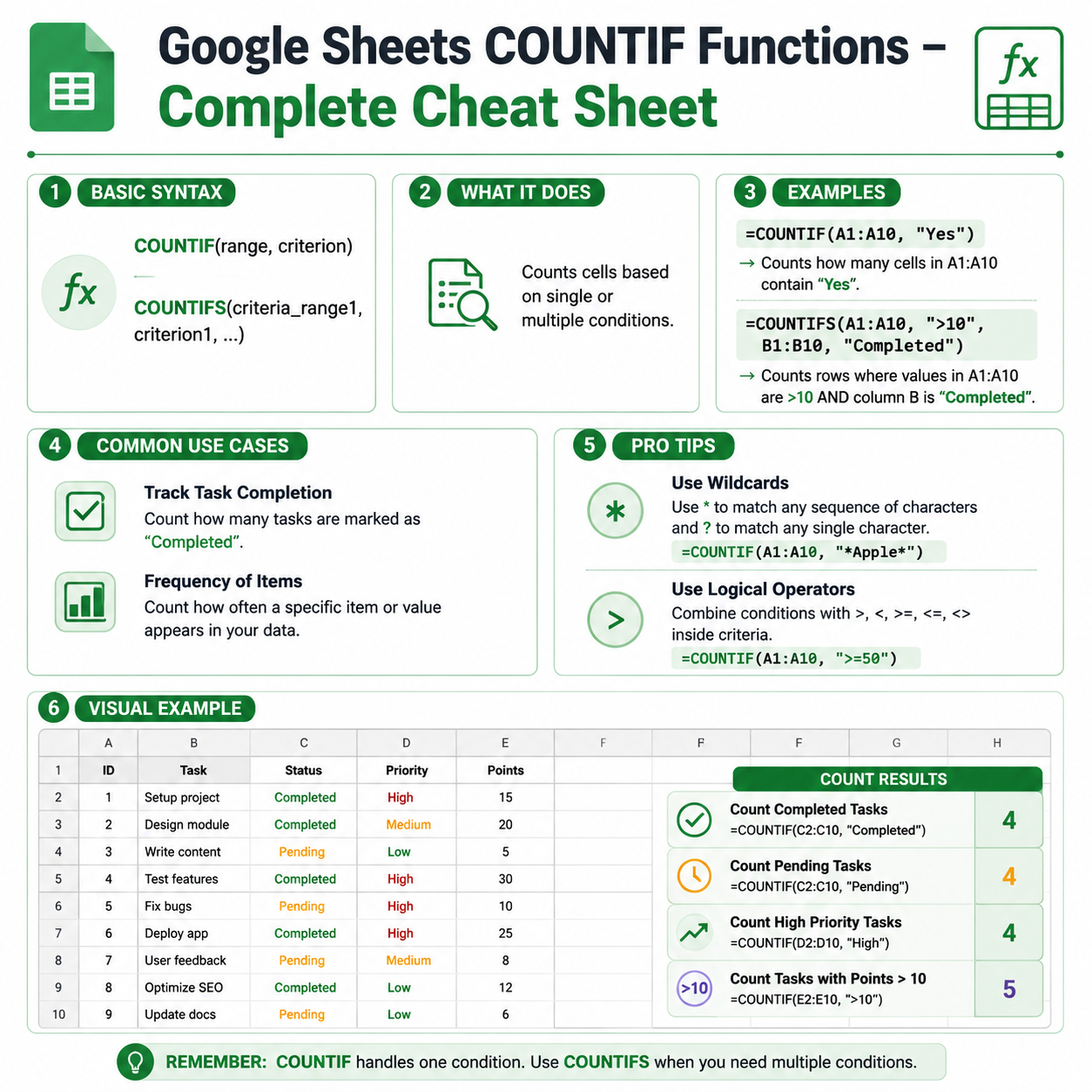
Looking for a fast and practical guide to counting data based on specific conditions? This COUNTIF Function Cheat Sheet is designed to help you analyze datasets, track performance, monitor records, and build smarter spreadsheets with ease.
Whether you're a student, teacher, business owner, accountant, data analyst, or spreadsheet enthusiast, this downloadable cheat sheet provides the essential COUNTIF function syntax, examples, and best practices you need to work more efficiently in Google Sheets.
What Is the COUNTIF Function in Google Sheets?
The COUNTIF function counts the number of cells within a range that meet a specified condition.
It is commonly used for:
- Counting completed tasks
- Tracking sales performance
- Monitoring attendance
- Analyzing survey responses
- Counting specific products or categories
- Creating reports and dashboards
- Filtering and summarizing large datasets
COUNTIF is one of the most useful functions in Google Sheets because it combines counting with logical conditions, making data analysis faster and more powerful.
What You'll Learn in This COUNTIF Cheat Sheet
✓ COUNTIF Syntax Explained
Understand how the function works and how to write conditions correctly.
✓ Counting Text Values
Count cells containing specific words or phrases.
✓ Counting Numbers
Count values greater than, less than, or equal to a specific number.
✓ Using Wildcards
Perform flexible text matching with partial values.
✓ Dynamic Criteria References
Use cell references instead of hardcoded conditions.
✓ Practical Business Examples
Apply COUNTIF in reports, dashboards, CRM systems, and trackers.
✓ Common Errors and Solutions
Learn how to troubleshoot COUNTIF formulas quickly.
What's Included in the Download?
Complete Formula Reference
A quick-access guide to COUNTIF syntax and conditions.
Real-World Examples
Practical use cases for business, education, finance, and operations.
Best Practices Guide
Learn how to create efficient and scalable formulas.
Troubleshooting Section
Identify and fix common COUNTIF mistakes.
Printable PDF Format
Perfect for keeping on your desktop or printing for easy reference.
COUNTIF Function Syntax
=COUNTIF(range, criterion)
Arguments
range – The cells you want to evaluate.
criterion – The condition that determines which cells should be counted.
Sample COUNTIF Function Examples
Count Cells Equal to a Specific Value
=COUNTIF(A2:A100,"Completed")
Counts all cells containing the word "Completed".
Count Numbers Greater Than 100
=COUNTIF(B2:B100,">100")
Counts all values greater than 100.
Count Numbers Less Than 50
=COUNTIF(B2:B100,"<50")
Counts all values below 50.
Count Blank Cells
=COUNTIF(A2:A100,"")
Counts empty cells within the range.
Count Non-Blank Cells
=COUNTIF(A2:A100,"<>")
Counts cells that contain data.
Count Text Using a Cell Reference
=COUNTIF(A2:A100,D1)
Counts cells matching the value stored in D1.
Using Wildcards with COUNTIF
Count Cells Starting with a Word
=COUNTIF(A2:A100,"Sales*")
Counts cells that begin with "Sales".
Count Cells Ending with Specific Text
=COUNTIF(A2:A100,"*Manager")
Counts cells ending with "Manager".
Count Cells Containing Specific Text
=COUNTIF(A2:A100,"*Google*")
Counts cells containing the word "Google" anywhere within the text.
Benefits of Using COUNTIF
Analyze Data Faster
Count records that meet specific conditions instantly.
Improve Reporting
Generate accurate summaries and performance metrics.
Build Smarter Dashboards
Track KPIs and business metrics automatically.
Save Time
Avoid manual counting and filtering.
Support Better Decision-Making
Gain insights from large datasets quickly.
Who Should Download This Cheat Sheet?
This resource is ideal for:
- Google Sheets users
- Data analysts
- Accountants and finance professionals
- Students and educators
- Project managers
- Sales teams
- HR professionals
- Researchers
- Business owners
- Dashboard creators
Whether you're a beginner learning formulas or an advanced spreadsheet user, this cheat sheet will help you use COUNTIF more effectively.
COUNTIF vs Other Counting Functions
Google Sheets includes several counting functions for different use cases.
COUNT
Counts only numeric values.
=COUNT(A2:A100)
COUNTA
Counts all non-empty cells.
=COUNTA(A2:A100)
COUNTIF
Counts cells matching a single condition.
=COUNTIF(A2:A100,"Completed")
COUNTIFS
Counts cells matching multiple conditions.
=COUNTIFS(A2:A100,"Completed",B2:B100,">100")
COUNTBLANK
Counts empty cells.
=COUNTBLANK(A2:A100)
Understanding these differences helps you choose the right function for your analysis.
Common COUNTIF Mistakes
Incorrect Criteria Syntax
Wrong:
=COUNTIF(A2:A100,>100)
Correct:
=COUNTIF(A2:A100,">100")
Counting Multiple Conditions with COUNTIF
COUNTIF supports only one condition.
For multiple conditions, use:
=COUNTIFS(A2:A100,"Completed",B2:B100,">100")
Confusing Blank and Empty Strings
Use:
=COUNTIF(A2:A100,"")
to count blank cells accurately.
Why Learn the COUNTIF Function?
COUNTIF is one of the most valuable functions for data analysis in Google Sheets. It enables you to count specific records, monitor trends, track performance, and summarize information without manually filtering data.
If you regularly work with reports, sales data, project trackers, attendance sheets, CRM systems, or dashboards, mastering COUNTIF can significantly improve your productivity.
It is an essential function for both beginners and advanced spreadsheet users.
Related Google Sheets Resources
You may also be interested in:
- COUNT Cheat Sheet
- COUNTIFS Cheat Sheet
- COUNTA Cheat Sheet
- COUNTBLANK Cheat Sheet
- SUMIF Cheat Sheet
- SUMIFS Cheat Sheet
- FILTER Function Cheat Sheet
- QUERY Function Cheat Sheet
- ARRAYFORMULA Cheat Sheet
- Google Sheets Dashboard Templates
Download the COUNTIF Cheat Sheet
Get instant access to this Google Sheets COUNTIF Function Cheat Sheet and learn how to count values based on conditions, analyze data more effectively, and build smarter spreadsheets.
Download now and master the COUNTIF function in Google Sheets.