
Introduction
Contents
- 1 Introduction
- 2 What Is n8n and Why It Works So Well with Google Workspace
- 3 How n8n Boosts Team Productivity in Google Workspace
- 4 Step-by-Step Guide: Automate Google Sheets with n8n
- 5 Real-Life Team Use Cases
- 6 Best Practices for Using n8n with Google Workspace
- 7 Security & Admin Considerations
- 8 Conclusion
- 9 Next to read
- 10 How AI Can Boost Productivity Using Google Sheets
Modern teams rely heavily on Google Workspace collaboration tools, Google Sheets, Docs, Drive, Gmail, and Forms, to get work done. But as teams grow, so does repetitive work: copying data, sending emails, updating spreadsheets, and generating reports.
This is where n8n, a powerful open-source workflow automation tool, changes the game.
By using n8n with Google Workspace, teams can automate repetitive tasks, connect apps seamlessly, and create intelligent workflows that save time, reduce errors, and improve collaboration, all without heavy coding.
What Is n8n and Why It Works So Well with Google Workspace
n8n (pronounced “n-eight-n”) is a low-code automation platform that allows you to visually connect apps and automate workflows.
Why n8n + Google Workspace is a Perfect Match
-
Native integrations with Google Sheets, Docs, Drive, Gmail, and Forms
-
Visual, easy-to-maintain workflows
-
Self-hosted or cloud options (great for IT admins)
-
More flexibility and lower cost compared to Zapier or Make
✅ Ideal for operations teams, IT admins, analysts, and managers
How n8n Boosts Team Productivity in Google Workspace
1. Automating Google Sheets Workflows
Using n8n, teams can:
-
Automatically update Sheets from forms, APIs, or databases
-
Clean, transform, and validate data
-
Generate scheduled reports
Example:
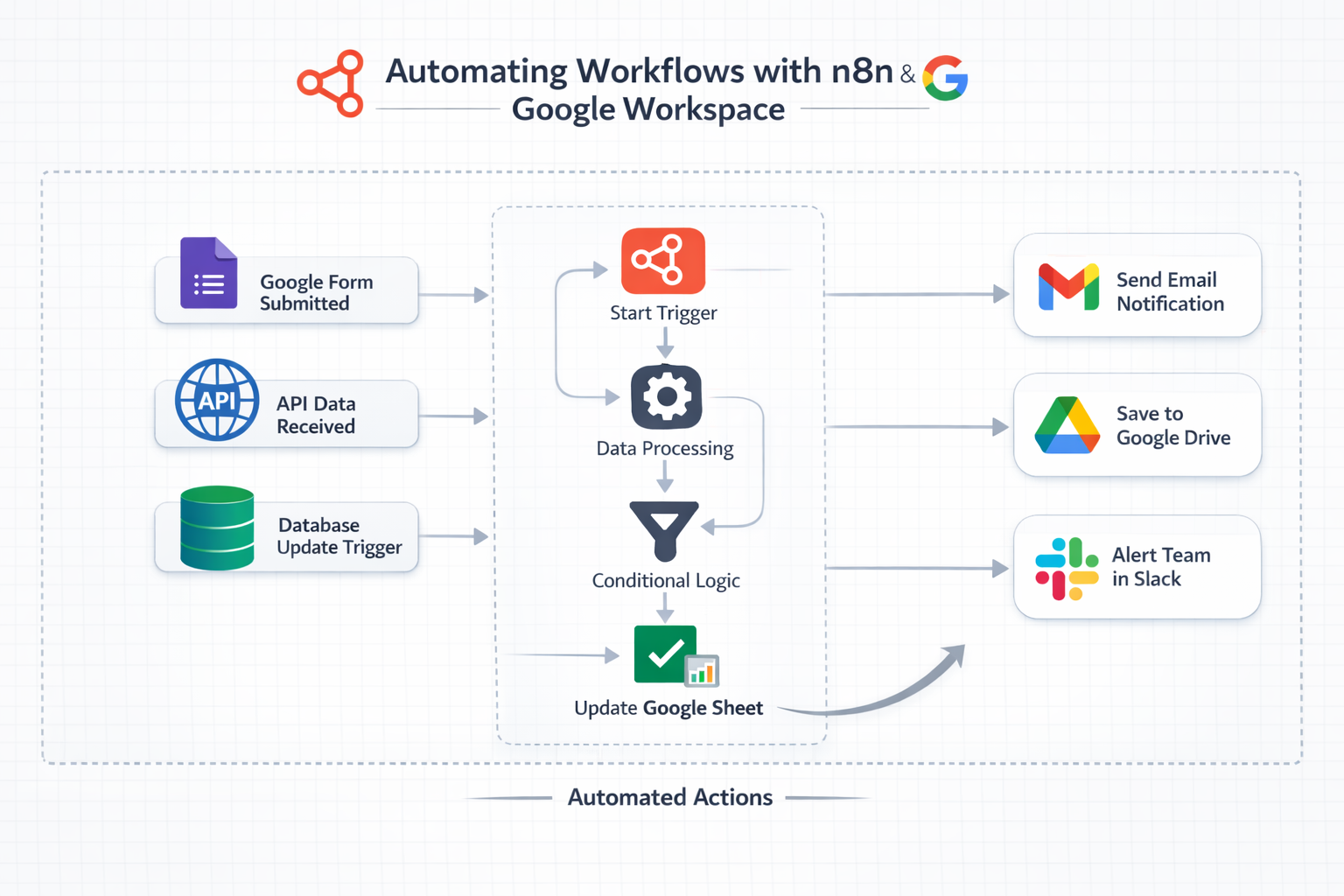
Every time a Google Form is submitted → n8n processes the data → updates a Google Sheet → sends a summary email to the team.
2. Smart Document Automation with Google Docs & Drive
n8n can:
-
Auto-create Google Docs from templates
-
Rename, move, and organize files in Drive
-
Convert Docs to PDFs and share them automatically
Use case:
Sales teams auto-generate proposals from Google Sheets data and store them in the correct Drive folder—no manual work.
3. Gmail Automation for Faster Communication
With n8n + Gmail, teams can:
-
Send personalized emails automatically
-
Trigger emails based on Sheet updates
-
Notify teams in real time when actions are required
Example:
When a task status changes to “Approved” in Google Sheets → n8n sends an automated Gmail notification.
4. Connecting Google Workspace with External Tools
n8n allows Google Workspace to talk to:
-
CRMs (HubSpot, Salesforce)
-
Slack or Microsoft Teams
-
AI tools (OpenAI, Gemini APIs)
-
Databases and internal systems
This turns Google Workspace into a central automation hub.
Step-by-Step Guide: Automate Google Sheets with n8n
Example: Automatically Log Google Form Responses
-
Create a Google Form connected to a Sheet
-
In n8n, add a Google Sheets Trigger node
-
Authenticate using Google OAuth
-
Add logic (filter, transform, enrich data)
-
Send results to:
-
Another Google Sheet
-
Gmail
-
Slack or Docs
-
-
Activate the workflow 🎉
🟢 Result: Zero manual data entry, instant updates, and real-time team visibility.
Real-Life Team Use Cases
Marketing Teams
-
Auto-update campaign dashboards in Google Sheets
-
Send weekly performance reports via Gmail
HR & Admin
-
Process onboarding forms automatically
-
Create employee folders in Google Drive
Finance & Operations
-
Sync expense data
-
Generate monthly reports without manual work
IT & Admin Teams
-
Monitor workflows
-
Enforce structured data handling
-
Reduce shadow automation tools
Best Practices for Using n8n with Google Workspace
✅ Use service accounts for shared workflows
✅ Keep Sheets structured for better automation
✅ Log errors and add fallback steps
✅ Start small, then scale workflows
✅ Document workflows for team transparency
Security & Admin Considerations
For organizations using the Google Workspace Admin Console:
-
Control OAuth scopes
-
Restrict app access
-
Use self-hosted n8n for full data ownership
-
Apply role-based access to workflows
🔐 n8n is especially attractive for security-conscious organizations.
Conclusion
Using n8n with Google Workspace transforms how teams work. Instead of spending hours on repetitive tasks, your team can focus on strategy, creativity, and impact.
From Google Sheets automation to smart document workflows and email triggers, n8n unlocks a new level of team productivity and efficiency.